
Download CatsEyeXI
Get started with our custom launcher or follow the manual installation guide
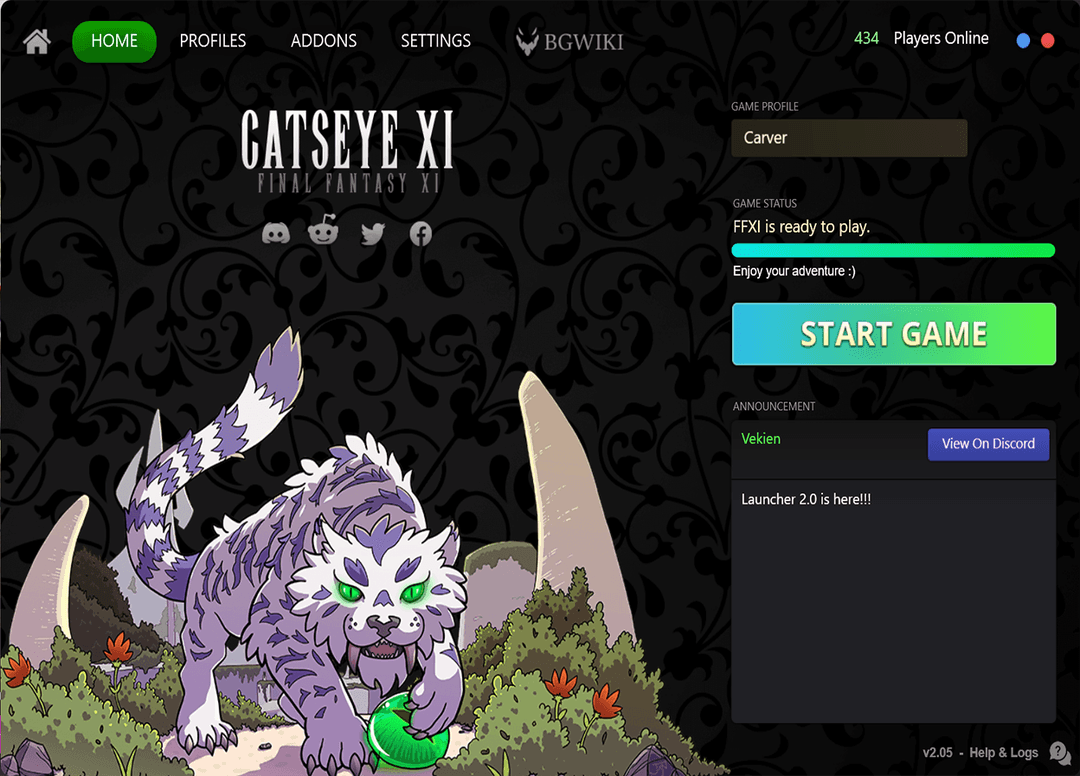
CatsEyeXI Launcher
Our custom launcher makes installing and updating FFXI seamless - no PlayOnline required. Get started in minutes with everything pre-configured.
Quick Tip
HD texture packs by Ashenbubs and all approved addons are included and pre-installed. No extra setup needed.
Easy Installation & Updates
Complete launcher with automatic updates
Addons Pre-Installed
All approved addons ready to use
HQ .DAT Pack Included
Enhanced graphics and textures
Multiple Profiles
Configure different settings for each character
Installation Support
Community help available on Discord
Optimized Performance
Pre-configured for best gameplay experience
Installation Steps
Download the Launcher — Click the download button above to get the CatsEyeXI Launcher.
Install Prerequisites — The Launcher will automatically handle any required components like DirectX and Visual C++ redistributables.
Launch and Play — A desktop shortcut will be created. Open the Launcher and start your adventure!
Creating your Game Account & First Character
Before you can log in and play, you need to create a character through your CatsEyeXI account.
One CatsEyeXI Account, Multiple Game Accounts
Your CatsEyeXI account supports multiple FFXI game accounts — one per game mode. Each game mode is a separate play experience with its own characters and progression.
CatsEyeXI Accelerated
Enhanced XP rates, easier travel, and quality-of-life improvements for a smooth adventure.
Crystal Warrior
Self-found ironman and hardcore challenge mode — every piece of gear must be earned yourself.
Wings-Era Warrior
Classic experience without trusts — authentic 75-cap FFXI as it was meant to be played.
Creating your First Character
Log in to your CatsEyeXI account at catseyexi.com using the Login button in the top navigation.
Click “Create Character” from your account dashboard and choose which game mode you want to play on.
Enter a character name and confirm. Your game account credentials will be displayed — save these as you'll use them to log into the game via the Launcher.
Add your character to the Launcher under the Accounts tab using your game account credentials, then click Start Game!
Seeing “Valid Content ID not Found”?
This means you haven't created a character yet — or you're logging in with the wrong game account. Head to your CatsEyeXI account, create your character first, then start the game.
Discord Community & Support
Our Discord is the best place to get help, meet the community, and stay up to date.
Join the Community
Meet fellow adventurers, join events, and be part of the CatsEyeXI community.
Installation Support
Stuck on setup? Drop a message in #installation-support and the community will help you out.
Bug Reports
Found something broken? Report it in our Discord so the team can investigate and fix it.
System Requirements
Minimum Requirements
- ✓ Windows 10/11 (64-bit)
- ✓ Intel Core i3 or AMD equivalent
- ✓ 4GB RAM
- ✓ 20GB available storage
- ✓ DirectX 11 compatible GPU
- ✓ Broadband internet connection
Recommended Requirements
- ★ Windows 11 (64-bit)
- ★ Intel Core i5 or AMD Ryzen 5
- ★ 8GB RAM or more
- ★ 25GB available storage (SSD preferred)
- ★ Dedicated graphics card
- ★ Stable broadband connection